BrandIn connects to Microsoft 365 using delegated Microsoft Graph permissions. IT administrators can easily accept permissions in the BrandIn admin center. Permissions can then be reviewed and revoked in Entra.
✅For the best user experience, we recommend that IT administrators accept the required permissions on behalf of the entire organization using the BrandIn admin center.
How to accept permissions on behalf of your organization
- In the BrandIn admin center, select accept for any permission. A Microsoft permission request popup opens.
- Tick “Consent on behalf of your organization” checkbox.
- Select Accept.
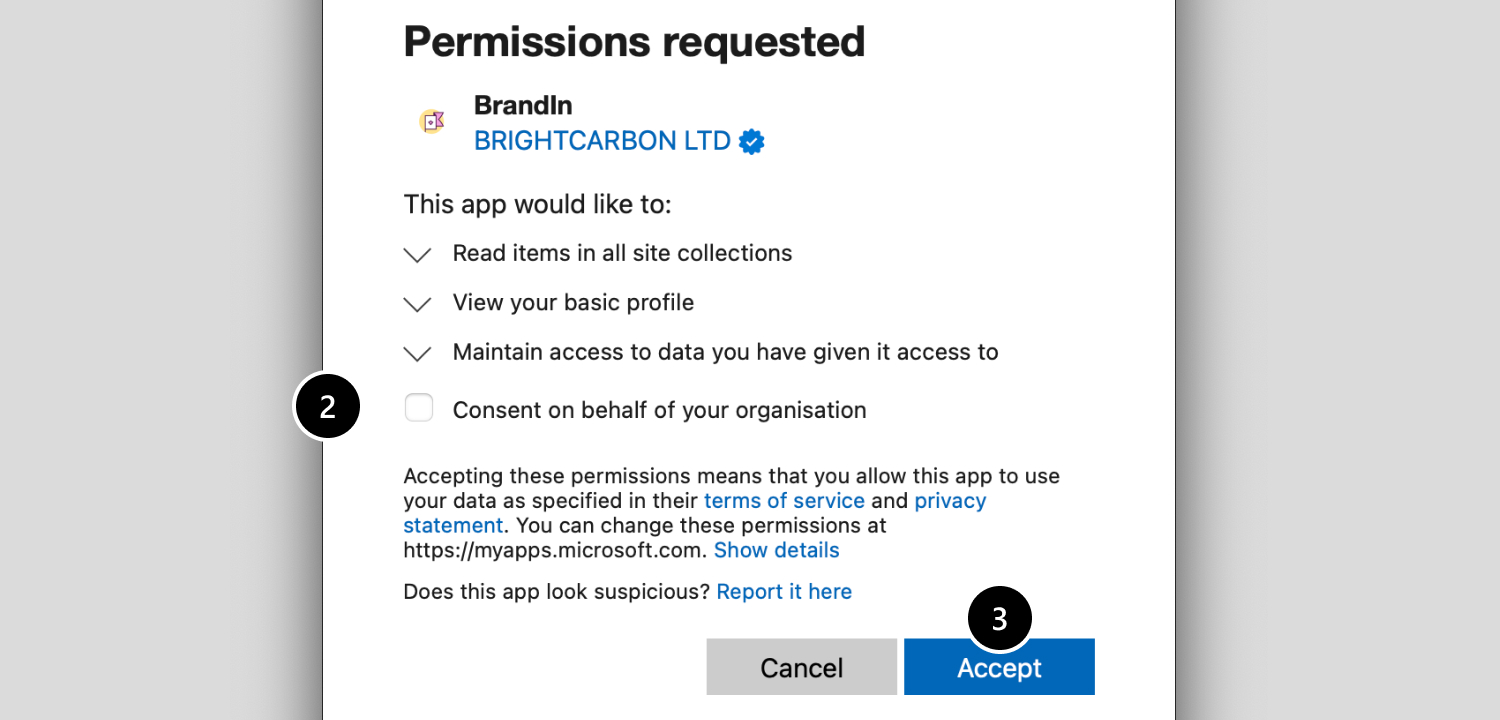
ℹ️If you can't see the "Consent on behalf of your organization" checkbox, reach out to your M365 Global Administrator. They will have to complete the process in this article.
Permissions required for all users
These permissions are required for BrandIn to work. You can accept these permissions on behalf of the entire organization.
Authentication
BrandIn uses the Microsoft Authentication Library (MSAL). It uses offline_access, openid, profile, and email by default for authentication and signing in.
User.Read — View your basic profile
Allows BrandIn to read basic user details for the signed-in user. Used for user interface personalization.
Sites.Read.All — Read items in all site collections
Allows BrandIn to read SharePoint and OneDrive content the signed-in user has access to. Lets users seamlessly access asset libraries stored in SharePoint and OneDrive.
Administrator permissions
Only used by BrandIn administrators. These permissions enable advanced administrative functionality and are entirely optional. BrandIn administrators can visit the admin center to request these permissions from IT.
ℹ️For the best user experience, we recommend that IT administrators accept all permissions on behalf of the entire organization.
Files.ReadWrite — Have full access to your files
Allows BrandIn to create files and folders in the signed-in user’s OneDrive. Lets admins explore BrandIn’s features in a demo workspace.
Files.ReadWrite.All — Have full access to all files you can access
Allows BrandIn to create files and folders in SharePoint and OneDrive locations that the signed-in user can access. Lets admins split large PowerPoint files into individual slides to simplify slide library setup.
User.ReadBasic.All — Read all users' basic profile
Allows BrandIn read basic user details such as names and email addresses. Lets admins invite colleagues to BrandIn while displaying their information in the invite interface.